Saturday, January 18, 2014

How to Remove Virus Without Antivirus

There are many PC users having no antivirus installed in their PC’s. If you have no antivirus in your PC and your PC got infected with virus, don’t panic you can also remove virus from your PC manually. There are few steps are required to clean your infected PC manually and required some computer experience. The first thing you need to know the type of virus and also search out the location of virus and entries into the registry, which will be helpful to remove virus manually through downloaded tools from internet.

Most PC user prefers to download specific virus removal software, generally known as “virus remover” to remove virus. It is however significant to identify that these kind of programs makes a substantial piece of antimalware software in computer market, which is a huge motivation for some programmers to earn instant money by introducing such kind of virus removers with middling scanning engines, bad algorithms, and without technical support.
How to remove virus from computer


Therefore, it is very important to think before taking any decision regarding using such kind of virus removal downloaded from internet. It is better to spend some time to research about best available programs for virus removal. The best way is to visit different antivirus sites and read the reviews and comments to find out the quality of particular virus removal.

Most users prefer to use free antivirus removal software. But the only problem with free tools, most developers scam to promote their software’s through free virus removal product. These developers force web surfers through scam to download and install their free tools. Sometimes, these free tools become dangerous for PC as it may contain venerable executive files, which show that your computer is free from virus but actually it has become infected. So, it is better to find out through little research about clean and clear virus removal tools before downloading and install them to your computer for virus removal.

If you don’t want to install any virus removal tool, you can also clean your pc through online virus removal service free of cost. Online virus removal service is available on all the major antivirus software developers’ official website. The service is available for all users, the only thing you need a stable internet connection. Online virus removal services  has not similar features for detecting and removing virus, so choose the best online virus removal service which suits to your requirement.
remove virus

There are many reputable free virus removal tools available developed by volunteers. These special kind of virus removal tools are use to remove range of virus and malware. Major antivirus companies are not provided their full services through online virus removal services, so it is difficult to identify and remove latest viruses through online virus removal service. The latest scan engines are available in major antivirus paid software’s.

Sunday, December 8, 2013

Spam Emails Protection

Many internet users received spam emails on daily basis due the irregular activities of some spammers. If you want protect your inbox from spam emails than adopt spam prevention strategies that would either remove your spam emails from your inbox or minimize the no of spam emails.

You can also use Spam emails protection software which helps you to minimize or remove the unnecessary spam emails in your inbox. This type of software will promptly remove large number unwanted spam emails and free your inbox from these kinds of junk emails. You can either use free spam protection emails software or any good paid software. Lots of Anti-spam software’s are available over the internet which helps you to clean your inbox from spam emails; the popular software’s are Spam Fighter, Mail Washer, POP file and Spam Titan.

If you don’t have any information that how to manage and handle the anti-spam email software to prevent from spam emails then use available help and tutorial provided by particular free or paid software. Through the tutorial you can easily learn that how to setup your software to protect your inbox from all kinds of spam emails.

Spam Email Protection

It is difficult to impose law against spam / junk mail sender due to massive internet user and websites. No one wants Spam emails in their inbox, but it’s difficult to stop them without using any spam protection method or software. Most of the spammers belong to under developed countries having no law to protect against these kinds of illegal activities. Countries where spam protection filter and law has already successfully imposed, spamming is nearly impossible while spammers move to countries where no particular spam protection is available and establish their networks. Spam emails basically sent on bulk quantities to random email addressee used by spammers for fulfilling illegal means. Spammers are also called cyber criminals and attack host computers through spam emails for their negative means.

The demand of anti-spam email software increase day by day as individual as well business owner’s wants to protect email accounts from unwanted spam emails. Now very smart and up-to dated software’s available over the internet having advance features to protect your email account from spam mails.

It is very difficult to stop unwanted spam emails until you use suitable spam blocking software to block them. You can also install spam filter to stop bulky junk emails or inform your net service provider to block unwanted spam emails.
   
How to stop spam email
If you don’t want to receive any kind of spam emails in your box use proper spam blocker but sometimes spam blocker blocked important and known emails. But through proper guidance of software help tips you can easily setup your spam blocker software. The spam filter is use to block unwanted emails and store them in different folders. You can erase all or particular spam emails from these folders.

The spammers use all the efforts to by pass the restrictions of spam filters but the best is update your spam filter to avoid any future spam email. I hope you have fully aware about the spam prevention tools and how to use them to protect your inbox from spam emails.

Saturday, September 14, 2013

FBI Virus Removal Instructions

Nowadays a latest internet virus is disturbing most PC users. This is a unique ransom type virus message appeared when your PC got infected with FBI Virus. You receive a false FBI Cyber Crime Department message appear continuously that you are involved in negative activities like downloading pirated movies or music or download any teenager porn material and requests to lock the computer. This is a false message and purpose is take ransom from PC users to free from these crimes.

The virus disabled the access to your personal computer and demand ransom money between $200 to $500 to set your personal computer free and regain your access. The virus directed to pay the ransom amount through prepaid card called Green Dot MoneyPak. The purpose of this card is transfer ransom money in dollars to different country. If unfortunately you got stuck in this problem and pay the ransom amount but your personal computer is still in locked condition and what will be the next step to resolve this problem.

FBI Virus Removal

The virus is introduced in August and known as Reveton Ransomeware Virus and starts forwarding a false message that on behalf of FBI’s Internet Criminal Complaint Center that your are involved in criminal activity. The virus program forces the use to clicks on negotiation web page and stay there for a minute. The virus then ultimately blocked the user’s desktop and shows the message that you are involved in Cyber Crime and break the FBI’s Law.

The screen blocker virus administrate from the USA to control the consumers by a group known as Urasy. This is a ransomware and according to report, different versions of this virus have already been multiply to different countries. As this is an internet threat, so the route of this ransomware is your IP address. This virus identify your IP address and than penetrate in your system. The result of this threat is false message appeared on your screen on behalf of FBI Cybercrime Department and this will block your desktop screen. This is the sign that your computer is now got infected with ransomware infection.
FBI Virus Removal Tool

The main source of this virus is internet so you either got infected through email or may be you trap through a tricky web page as there are lots of versions of this virus. This virus neither infects nor destroys your valuable data. This ransomware can remove manually if you have some technical knowledge of Windows operating system. You can also repair this virus through some technical or computer experts.

FBI Virus Removal Tips

The removal of FBI virus is very easy and most computer experts recommend following tips to eliminate this ransomware manually from your personal computer. The steps are appended below:

Step 1: Reboot your computer and press F8 before it starts in normal mode, select the option run computer in safe mode.
FBI Virus Removal Free

Step 2: Press and hold Ctrl+Alt+Del to open the Task manager window to stop the running of FBI Moneypak Virus/ Spyware. Click on the services tab and click to close the services running with the name of FBI Money Pack Virus or some other name which gradually changes rapidly and shows different name each time.

Step 3: Once you stop the services of this virus than go the windows and program files folder to remove the entire relevant file to FBI Moneypak Spyware and adware.

Thursday, August 1, 2013

Best Free Antivirus 2013

If your resources are low and you don't desire to waste money on an anti-virus program, you should think about the following six: Avira Antivirus Personal, Microsoft Security Essentials, Comodo Internet Security, Avast Anti Virus Home Edition, AVG 8. 5 Free and PC Tools Antivirus Free Edition. These free of charge apps have been tested on different machines and operations systems.

However, remember that without any cost software will not provide you all that the rewarded ones do. Nearly all free software gives slight to no technical help if you run into troubles. They may give online forums or cost you for over the telephonic technical help. For example, AVG gives paid telephonic help for $50 which is in fact mad and not value it.

 
best free antivirus for windows
Free software has less commonly updates which in nowadays world with latest viruses and Adware come into view all the time maybe a main trouble. Free software also gives partial features. For example, Avira is purchased application anti-virus software will scan data earlier than it's downloaded to your PC, but its unpaid free version doesn't.

At last, some free antivirus will push for you to download toolbars and to upgrade by bought the paid version. Some companies will suggest you a free version but their objective is to have you upgrade to the paid version ultimately.
free antivirus for windows 7

If you are in the market for an efficient paid antivirus software application but don't be familiar with which one to prefer or whether the one you would like to buy does a fine job, you should believe testing initial via a free trial. You may desire to select a program such Norton Antivirus Free Trial, which propose 30 days of complete functionality of the Norton Internet Security software package to check for free. Nearly all if not all, software programs recommend a free trial period for you to check out their product prior to you buy which is a big thought.
free antivirus for windows 8

While testing a program, you have to give unique consideration to how the program influences the performance of your computer. You certainly don't desire a program slowing down your PC which is irritating. You also don't wish for lots of pop ups notice by the program during working on your computer, which might also be irritating. You also desire to give notice to how frequently the program updates. Regular updates indicate that latest viruses are being found and are being sum up to the software on your PC to stay it secure.

Saturday, January 5, 2013

Trojan Horse Virus Removal

Deleting a Trojan horse from your PC does not have to be tricky. This type of virus connected itself to many programs or files that have been downloaded from the Internet. If your PC slows down, it may indicate that it is infected with worms. By means of a good quality adware and anti-spyware has helped to clarify the pop-up windows on your computer, and the speed increased considerably.

For example, when you download a toolbar to your website without even knowing other malicious viruses enter the system and start delivering your emails, applications and other information. Your computer is open to many different types of threats, and you run the risk of losing important information. Learn how to remove worms and malware and suspicious virus by reading this article.

Most computer users rely on the Internet for commercial purposes, or surfing. They may from time to time to shop online. That's when the databases, personal data and credit card information stolen at risk of malware. It should be a great concern to all PC owners and should take measures to prevent this from happening.

There are several ways to stop these programs from accessing the system. One such method is to install an anti-adware software, which aims to identify these threats. Businesses and individuals are prone to fight against piracy information and services should be considered as a serious anti-adware program.

Spyware and viruses are a major threat to the security of your computer; these programs steal important data and system settings. Watch for signs to confirm, when you see unusual changes in browsers, random error messages, and often crashes the computer. So the best way to solve this problem is to install anti-spyware and adware that can be used to prevent the virus from entering the system.
Trojan horse removal

The advantage of using anti-adware software is that they correspond to the pop-up ads stopped. Not only do they block the browser, but they also slow down the system and at times self-installing unnecessary applications without your knowledge. Every computer user is advised to ensure that they are good anti-computer programs. It is also important to check if your computers on a weekly basis as new threats are released on a daily basis.

Before choosing the system best suited protection, keep in mind a few things, like how much you have to pay to install such software. The most important criteria are the protection of the software can be updated on a regular basis. Without this ability, your personal information is not protected. The program should also be able to detect potential threats and destroy them.
Trojan horse removal free

Identity theft is one of the most important issues, like most online users have the need to expose their debit or credit card to other organizations when purchasing products or services Internet. All computer owners learn how to remove Trojan horse or other harmful threats to their systems. Fortunately, there is an anti-adware and anti-spyware that does all the work for you and provide optimum protection. So you can surf the web and shop with peace of mind knowing that your data is safe.

Friday, December 21, 2012

Remove Runtime Error 217

It's a quite embracing when you continuously getting run time errors. The last thing you need is an error message when you are working on something important. Instead of ignoring these errors, it is important that you try to solve them. The reason is that it can sometimes be the cause of something that could result in a greater threat.

For example, a runtime error 217 can be caused by a virus, and if the program is infected, it can spread and invade other programs. Malware is the most common problem and boring, never completely protected. Of course, if you never surf the Internet or install anything you're probably safe but if you're one of the millions of people who do not pay attention.

Runtime Error 217

Deal with the virus is usually as simple as installing a reliable antivirus tool, and if you do not already install on your computer, it is absolutely necessary. The choice of tools free antivirus is vast and you should be able to find one that has a good reputation online. Once it is installed, it is important to maintain and analyze your hard disk on a regular basis to find problems.

A runtime error 217 is down Malware because it can be a problem updating. In some cases, the improvement program, or even a web browser can cause all sorts of problems. If you had an error code after upgrading to Internet Explorer, try going into Internet Options and restore settings in IE. Be aware that this may disable bookmarks and temporary files, so you can save all your important files before proceeding.

Another reason for restoring IE default settings to remove the error codes is that it has been removed, you have installed. Additives may be incompatible with other software, if you find errors stop execution, this could be the answer. To find the add-on guilty, just take it one at a time until you get the message again.
Runtime Error 217 Fix

Update Service Pack operating system is also essential for the proper functioning of the system. Updates can be downloaded online from the Microsoft Web site or set your computer to automatically update the recommended updates. In addition to this, you should try to avoid downloading anything you do not trust, and keep your computer free from clutter with cleaning and optimization. There are tools both free and paid, depending on your needs.

Sunday, December 2, 2012

Win32 Autoit Virus Removal

The best anti-virus programs have earned a reputation as applications can effectively remove a variety of infections that can plague your computer. On the other hand, "win32.autoit" is a virus that has acquired the reputation of a very nasty malware that thrives in an environment where there is little protection from viruses. This application has the characteristics of a worm and a virus, and varies in size from 220 kb 275 kb. He came into the spotlight in late November 2006 and was a disadvantage, even though the most effective anti-spyware ever built.

The extent of the damage caused by the virus is relatively small compared to other PC threats such as Trojan. The virus affects the computer system itself because two hard disk, including its subfolders, and even removable media. It takes the form of a window "PE.EXE" file and is usually installed with UPX. Many of the symptoms can be indicators of viral infection system.
Win32 Autoit Virus
The first symptom means that the files will be a folder on the computer screen. Threat replicates in Windows executable files and root files are writable drives up forever. They usually create a new folder called Folder.exe. It also creates a number of files, the following names: % Windows% / RVHOST.EXE, % SystemRoot% / RVHOST.EXE. Both of these are duplicates. The virus then goes and copies its executable file to the Windows and root directories.

The virus then add a shortcut to the executable file to the registry, so that the worm can be run whenever Windows is started. This makes it possible to automatically launch the infection reboot. Folders that are stored in the root directory and the virus replicated in each case, the external expansion chassis "Exe".

The registry keys that are added a virus to prevent the launch Task Manager or the application to modify the registry so that the virus will stop working and start automatically. It also prevents certain tasks related to Antivirus detection and removal of viruses.
How to remove Win32 Autoit Virus

"Win32 Autoit" virus has occurred in some countries, such as India. There have been hundreds of reports on the impact the virus entered the computer systems of the questions still surround the mechanism of transmission of the virus.

The most common way the virus spreads to download files from the Internet division of suspicious sites and external storage media such as memory sticks and other external media.

The worm may be present in the computer system only if the user is strictly complying with the following measures. The worm can be removed by introducing a "Taskila / IM RVHOST.exe" from the command prompt. It can also be removed by removing the original file, which is made of the worm.

Saturday, December 1, 2012

Remove Runtime Error 339

You have scanned your computer for viruses and some of the updates are downloaded to your PC. You tried to install the software and running a registry cleaner, but you still get the runtime error 339 sadly, the efforts have been in vain, without a doubt, that this is a runtime error often refers to the missing file. In general, it is an OCX file, but it depends on the program you are using.

If it occurred after the removal of viruses, it could be that you have deleted a file needed to run a program. This can sometimes occur if a large file is infected, and removed from the system. Often the error occurs when starting the program. As most of the runtime errors, this happens because of a series of processes is corrupted or missing files is interrupted. In this case, the OCX file, which is necessary to open the program. These files are located in the Windows system directory.
Remove Runtime Error 339

The solution to this problem may be affected quite clear, and it is in most cases. Indeed, if the file is missing OCX source of the problem, then replacing it should solve the problem. The only problem to face is that there is no online database where you can download and save individual files easily.

The best way to get your hands on one of these files is to search online. In most cases, you should be able to find it. Once you have downloaded a copy, you can connect the Windows / System, save it by clicking Start, then Run, and type "regsvr32exe" with the name of the missing file. If you can not find the file, you can always send a request to a file on your computer using the forum. You can see that someone can send you a copy of the requested file.
 Runtime Error 339

Once this is done, the runtime error 339 is no longer visible. If this does not solve the problem, you may have to do extra work feet to solve the problem, some of the programs when you turn on your computer can cause runtime errors if they are in conflict with other software. You can test this by minimizing the number of applications that start automatically when Windows starts.

If you do not know how to do this, simply go to Start, then Run and type "msconfig". Start-up, you will see a list of applications that start up when you turn on your computer. You can remove unnecessary applications, clear the boxes. When you start again, you can see if the error recurs. If the problem persists, at least for now, the computer will boot faster.

Sunday, November 18, 2012

Facebook Virus Removal Tips

Facebook has been a priority for hackers and internet criminals in recent times. Hackers exploit mainly the vulnerability of the system networking friend of a friend on Facebook. Virus Removal on Facebook primarily involves the removal of virus-laden applications. Over time, various social technologies in used smartly. They actually managed to trick users. In most cases, these malicious programs disguised as legitimate Facebook applications. They are sent to the user's Wall catchy slogan, which moves the user to open an application. When the link, he is requested to permit the application and give the rights to display their profile and friends. This is the reason why these malware can spread so quickly on social networking sites.

Worse, some malicious applications are programmed to monitor the online activity of the user. Some people even collect personal information from you and move it to the author of the application. Generally, this information is sold to advertisers remunerative prices.
Facebook Virus Warning

If you do not click on such a link, and contains some malware, there are a few things you can do to remove the application, and to protect your account. Go to the Applications button in the lower left corner Facebook page. Edit the application. If you are using the latest version of Facebook, you can find reflected in the upper right corner of your Facebook page. Select Application settings and search for the wrong application. Then click on the X symbol and select Delete to get rid of malware application.

This application does not get to your profile. There are some extra precautions that you can take to protect the profile. You can browse through the list of applications in the profile. Remove applications you are not currently using. If you do not see ads distort applications, you can always click on Report spam. Facebook allows you to block unwanted applications. Just go to the home page of applications on Facebook and click on the Application Block. This will ensure that you do not get any other messages concerning the application thugs.
Facebook Virus messages

There are a variety of technical support organizations that support virus removal Facebook. Tour of social engineering can be a bit problematic for most of us. It is difficult to determine which application is legal and what is wrong. When you run the theft of information or identity theft, evil can not be repaired. Therefore, if you shop online through the system, it makes sense to use extra precautions for subscribing to software virus removal support or service.

Saturday, November 10, 2012

Online Virus Scanner

If you are frequent PC user, you had probably experience some computer virus issues in past. If you are safe from viruses than you are lucky, but you have to take some protective actions to protect your PC for future issues; if you are running Windows.

There are many free online virus scanners available over the internet and each having its own strength and features without any match with standalone software have their uses. Initially you can’t understand that your PC infected with virus or malicious infection or behaving strangely? Or you will see that most of your software has been disabled, and you’ve anxiously restarted in Safe Mode seeking a resolution.

Here I am going to give you brief information about 4 online virus scanner, you can scan your whole PC or single drive or any Pen / USB drive to make sure that your System is virus Free.

Online PC Scanners

BitDefender QuickScan

Bitdender quickly online scanner works in almost all browsers. Visit the website and simply install the add-on quickly (32 bit / 64 bit) what virus database updates are installed together with the add-on after installing accept the terms and finally click Scan.
BitDefender Online Scan

PC then scanned in record time to tell whether you have any unpleasant viruses, Trojans or any other malware hidden in the memory of your computer. It does not scan your entire hard drive, but if your computer is up and you suspect malware is the culprit, Quick Scan should find.

Panda ActiveScan

ActiveScan regrettably only operational with Internet Explorer or Firefox, even though Panda advises that you should install the extension Internet Explorer Tab Classic compatibility; if you use Google Chrome.
panda online scan

The rapid analysis of the processes running on select Quick Scan, or if you want to go a little further, you can choose a complete analysis. Once you have selected click Scan and you will be prompted to download the extension (if you're using Firefox) or ActiveX (Internet Explorer, if that's your thing).

Scanner updates the definitions and run the scan of options earlier than sending fine or shocking news.

TrendMicro Housecall

HouseCall is totally browser free, which means that you can use with every web browser. It does this by wrapping the scanner a small executable file that you run scans your computer for signs of malicious software.
trend micro online scan

There are two versions to decide "32bit" and "64bit" and you be supposed to make a option based on the operating system. In case you have questioned which version you have, browse the Control Panel from the Start menu and select System. Once you have downloaded the file, run it and updated the definitions for you.

Once you have accepted the license agreement, click Scan now to see what is hidden in your PC.

F-Secure Online Scanner

Using the Java check your computer more nasty, F-Secure works with all browsers, provided that you have installed Java and JavaScript. You can start the scanner you must accept the license terms check box, and then click Run Check.
F-secure online scan

You will need to allow a Java applet to be carried out before the scanner is started in a separate window. You are then free to choose Quick Scan, Full Scan and Custom Scan My (where you can choose songs from your hard drive to check).

Once you have selected the scanner to update the definitions (it takes a few minutes, but stick with it) and checked the computer problems.

Conclusion

Solutions Online is a big way to guard your valuable data, but these services are still not installing anti-virus software to your own machine. There are lots of totally gratis solutions out there, some of the ads and the odd pop-up, and others just sit there and do their job.

We have a list of the top 10 here, and it is also interesting to look out for spyware programs such as Malwarebytes and Spyware Terminator. Antivirus is not totally protected from attack, and the browser is best to use familiar sense.

Are any of these services helped you in the past? Never dealt with a particularly nasty virus? Are these Safety Tips for You? Tell us comments.

Saturday, November 3, 2012

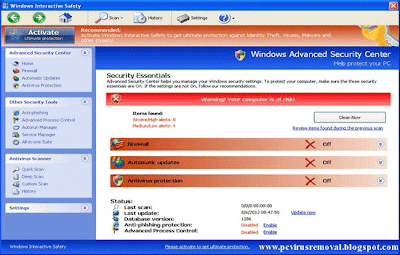
Windows Interactive Safety Virus Removal

Interactive Windows Safety is a latest online risk. It causes a lot of problems for users on the web. This virus may resemble a genuine antivirus program. It is a program that is wrong. It is not a legitimate user and the computer needs to know what this virus is and how to remove it from any computer is turned on.

This software can be classified Scareware. It releases a lot of messages that are not real, so that users are afraid to buy the patch. This patch is not real. You do not need to buy a solution to everything. The real solution is to remove this malware from your PC. When the malware has been removed you should be.

This virus can enter your computer take advantage of zero-day attacks. Some of the vulnerabilities can be found with browsers web, install Java or Flash, or even operating systems. Be sure to upgrade the safety of your computer so that you are protected against new threats such as this.
Windows Interactive Safety Virus Removal instructions
Computer users should be very wary of Facebook ads and emails that appear insignificant. If you e-mail does not feel right, then do not open then. Instead, send an email to the sender to make sure. Do not open e-mail, because if you do, it may result in you get a virus.

Messages on the computer infections and Trojans have started to appear. These ads may seem daunting, but they are wrong. It is easy to see why they call it scareware. Do not be fooled. The computer system is in no danger and personal information is very good.

The coming step is to remove the Windows Security interactively from any computer. You can remove the malware infection; you should use a step by step guide to remove viruses. Find virus removal guide to help you. Enter the guides that are full of fluff. Select a travel guide that actually works. Once the virus is removed, you will need to choose another antivirus program to make sure nothing is left behind. Do not skip this part. Make sure to run a full system scan of your safety.
Windows Interactive Safety Virus Removal
Do yourself a favor and search out the top antivirus program that you can purchase to prevent such attacks from occurrence and corruption your computer system. Being Internet Security can be saved to your computer. Adequate security and protection line is mandatory in today's technology leads the world. You have peace of mind and protection safety. Antivirus is always necessary.

Friday, November 2, 2012

Ukash Trojan Virus Removal Tips

Ukash virus is Trojan horses, which prevent infected computers. This group of parasites official name of the institution to the computer to look for credible people and cheat money by using prepaid cards as Ukash. When the computer is locked, the user can only read the message. In general, the warning includes excerpts from articles and laws copyrighted content, its use and distribution. The user's computer is locked accused of a list of crimes. These can include the illegal use and distribution of copyright content, such as movies or music, view or distribute pornographic and similar crimes. You can open your computer according to the message; you will need to pay a fine system Ukash. Post promises that the open system within 24 hours after payment has been made. It scared the owner infected machine, if the fine is not paid, the computer can be seized and the person may even jail time.

Unfortunately, the payment of the fine does not solve the problem. This is just a very well thought out scheme to extort money. Everything looks very convincing so many computer users to pay a fine without a deeper examination of the problem. Do not rush to spend the money, because he is clearly a scam. No official regulatory agencies to accept payments using payment systems such as Ukash prepaid.
Ukash virus removal

When it comes to Ukash virus, Trojan Reveton name must be mentioned, as this application sinister is responsible for most of the Windows virus terrorize. Some of these infections are viral GVU, Federal Bureau of Investigation virus, Luxembourg police and the International Police Association virus. Despite the consequences, all Ukash infections are characterized in the same manner, and after the malignant components to lock the computer to access and remove the desktop, the user is presented with a Windows message imaginary. Almost always, this ad is full of false accusations of cyber piracy, terrorism, or the distribution of pornography.

In general, a computer virus Ukash attacks after visiting an infected site. There is no need to be enabled with this kind of risk, such as pornography. It could be quite regular and legitimate site visit every day, only this time it gets corrupted and serves as a malicious advertising. In your own way to get a safe PC is by downloading infected files. Ukash Virus can be shared by using Trojans already present on your computer as well. If you do not have efficient anti-virus software, you have a higher risk of infection of these parasites.
Ukash virus problems

Ukash Virus removal is not an easy task, and even experienced users of Windows are likely to cause serious problems rootkit Trojan functionality. Nevertheless, it is possible to open up the computer and removes the virus paralyzed Ukash, the form in which it can be, but does not meet the requirements for a ridiculous ransom payments. You can find more information on how to remove the infection manually and automatically, follow the link resources. Overall, Ukash virus is to be destroyed, an air of confidence, which is why it is important to get infected out in any way possible.

Payment of the fine is to open the computer, you may ask, how to fix it. A comprehensive guide to using Ukash virus removal can be use for more information. Do not forget to update your antivirus is when the computer is fixed. This freeloader, like most of the Trojans, catches into your computer via a system vulnerabilities and security holes, mostly in Java or browser. Therefore, it is highly recommended to invest your money in a reliable security rather than spend Ukash scam-like virus.

Wednesday, October 10, 2012

ComboFix Review

ComboFix is a bit of software that nearly all PC’s must have. What is weird is that although it is freeware and expenses nothing, there are still PC users who run their computers without it. Certainly, one of a lot of causes why PC users can not select what ComboFix on their PC’s because it is spread over the Internet with no any warranty, which is definitely not a end user total assurance.

Essentially, ComboFix is private to the user and not the business user, but is used by all kinds of people. ComboFix software intends to find a virus and once found will begin the elimination process, which tops with ComboFix reboot.

ComboFix

Installing ComboFix

ComboFix is a program very technologically advanced, so that the installation process may take a little longer than the average program. However, the installation process is very simple and does not tend to last about 5 minutes. The ComboFix have included a guide on exactly how to install the program to ensure that there is no setback during the period when the product is installed.

When using ComboFix

Firstly, ComboFix is tremendously simple to apply for every person, just because it is accessible as freeware. This represents that developers ComboFix not take any fee for PC users who already use their software. Of course, the main problem with this is that no guarantees are attached to the ComboFix software, so anything can go wrong with it at any time.
ComboFix Download

ComboFix Free Download

Certainly, ComboFix actually works. It works by discovery infected files on a computer, then place the real virus. Once the virus is restricted removal route begins, the elimination of the infection forever. During the removal process, ComboFix will ensure that the equipment is safe and complete the removal process to restart to make sure the infection is gone forever.

The grand craze about ComboFix is that from the instant it is installed, users are assisted each step of the method. There is a wizard in the ComboFix program that provides step by step directives village, explaining accurately how to get rid of any infection when they become visible. Each month that passes latest additions to the ComboFix added, making better and better every day!

Sunday, September 2, 2012

Google Redirect Virus Removal

Google Redirect Virus 2011 is one of the mainly widespread virus that is mainly circulating on the Internet during 2011. The most frequent indications of the virus are:

Redirected to other pages, if you have virus in Google search results

The pop-up advertisements appear in irregular intervals.

Redirected to other websites, even if they are into your browser's navigation bar.

Unfortunately, Google Redirect, 2011 particularly nasty virus or your computer and its security, which are most common are various risks:


It is redirected to malware ridden sites, these sites try to install malware on your computer that others, who key loggers, viruses, and identity theft can add.

It Will redirected to phishing sites. As usual site at the same sites, but in fact used to steal login information, but the information banks are displayed. EBay Clone include the phishing website, PayPal, Facebook, and online banking sites.
Google Redirect Virus Removal

Further, Google redirect, virus can contains the following functions:

Click Jack quietly in the background.Your computer to allow an open proxy server. This means that your computer could be used by other hackers anonymous access to Web sites. It is possible that such goods online with stolen credit cards to purchase can be used for criminal activities. Not only that, but it's a lot of bandwidth tract and may experience slow browsing.


How to remove the Google Redirect Virus 2011

Remove Google Redirect Virus 2011 Anti-virus and anti-malware usually through only a standard software can not be possible. This is because there's a little bit different virus detected virus containing thousands of stars are not. That the virus creators of "polymorphic" is, to change the virus code means, but the virus is maintained.
Google Redirect Virus removal online

Redirect-virus solution for Google 2011: Combofix (Redirect Virus right)

Google Redirect Virus Remover 2011 is the most effective tool. It has been specifically developed and the virus was coded to identify different forms of the virus string. Tools, Malwarebytes and Spybot as opposed to anti-virus vendors, the virus infects certain registry keys and DLL files that Google re-examined. This makes it quick and easy removal process.

This technical 24/7 support if you are stuck for life comes with free updates (very important because the new machines affect virus creators). A piece of cake to program the most novice computer users to use, he said. It's fast, easy and to make sure that the Google redirect virus problems will never have to worry about....

Wednesday, August 29, 2012

Latest Computer Viruses

Today the Internet is all about - and why not? Almost everything we do can be found at: information, jobs, friends and much more.

But it is not surprising that provides Internet lurk between the unit and is ready to destroy stolen. This virus. You have successfully web site, business and cause problems for people drowning.

These viruses are insidious. Human aspirations, places we want to assure you that we are the attack by hiding in use.

Using the latest scams that computer viruses are attacking us some examples are:

A. Fake job offer: For those who scams the latest virus online jobs are important goals. E-mail with the word employment covered by the virus to steal their bank account details, users are able to penetrate the computers and cash sender's e-mail wiping allows hunters a bad thing.

latest computer viruses

The victims of malware virus sender to change account settings, you can enable the inflow of remittances.

Always avoid fake job offer emails victims to avoid the virus, the companies never request that you open employment.

Anti-virus and other viruses. Viruses such as antivirus software can outfit your computer. If this is you, then you may e-mail or Web site via a free "antivirus software" by offering a security breach caused your computer.

Virus-laden e-mails and Web sites often a message (usually unwanted) indicates how poor or vulnerable software. Since then provide you with a link, as a legitimate and reputable anti-virus software is used by web site looks.

But in reality, once you click the link, you are actually virus free.

To avoid these types of viruses caught, always the developer's website to keep your antivirus software directly, to confirm the URL bar to see that this is actually true manufacturer's website, and domain Enter the name address bar instead of clicking on a link.

Third offline installer. Just because you are online does not necessarily mean you are protected from viruses. Congratulations online to get an online and have found them easy prey growth path.
latest computer virus attack

How was he? A person who is an expert in computer software is called, your budget and ensure that your computer is filled with viruses and malware.

The Internet will offer his or her services.

Once you are online, your computer and install a virus, so he has access to your files and documents man's position.

He or she also served as payment for your credit card. Before you know it, has all the information and lose money.

Perhaps the most common type of computer virus scam today.

Just knowing about these scams already, you protect yourself against them is a long way. But when you understand the risk, it is best to ensure that all cracks sealed in your computer's coach.

Make sure you install a good and reliable anti-virus software have been histories of each month or. Today, it is a world that has been DIGITIZED, there are many new forms of theft. New types damage generations of technological wonders, when your guard is ready to attack us. Do not give them to you.

Friday, July 27, 2012

Latest Malware and Scam 2012

London Olympic Scam Emails

Don’t get duped by official-looking emails that appear to be from London Olympic marketing team. Security researchers at McAfee say that, although the wording of the emails varies, thy all claim you have won a substantial amount of money as part of an Olympic Games promotion. The emails ask you to send a “processing fee” or “transfer charges”, so you can receive your prize.

Malware steals Money using Gmail

A new strain of the Zeus banking Trojan has gained access to bank accounts by asking people to link their credit cards with their Gmail and Facebook profiles. The messages, spotted by Bitdefender, appear on infected computers when you sign into your account. They claim that, by adding these details, you will be able to pay for items online by entering your email address, which is not true.
Gmail malware
latest malware


Amazon Emails link to Malware

Fake Amazon emails pretending to be order confirmations are tricking people into downloading malware onto their PC’s. If you click the link in the email to track your order, you will be taken to an infected WordPress site, which could compromise your computer’s security. The scam is proving successful because it is targeting people who have recently visited Amazon.com.

Mobile Malware

More and more cases of mobile malware are being reported, but are anti-virus firms overstating the danger? Network security firm Adaptive Mobile says security firms should focus on the number of infected devices, rather than the different viruses seen ‘in the wild’, because many of those will never get near a phone or tablet. “We are not denying that mobile malware is not out there, but we don’t see it spreading in the same way that traditional PC anti-virus vendors are suggesting, “said Ciaran Bradley at Adaptive Mobile.
Mobile Malware

Affect of Mobile Malware

The warnings about mobile malware are worth listening to, but the problem remains a minor one for most people. Keep an eye on your device for dodgy behavior, but if you are downloading apps from known brands and official stores, you are likely to be OK.

Whether research looks at infected devices or malware samples, reporting percentage growth from such a small number is an easy way to exaggerate statistics, so we share some Adaptive Mobile’s concerns. Phone malware will surely increase, but it’s sensible to treat with caution some of the more apocalyptic claims made by anti-virus companies.
Saturday, June 9, 2012

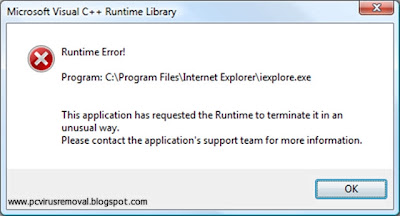
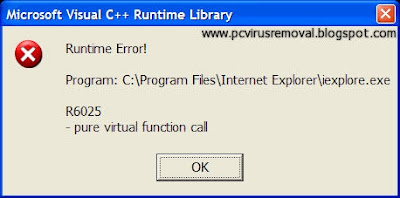
Runtime Error Virus

A runtime error occurs when there is a trouble during or later than the finishing of an application in a PC. A general reason of this type of error is issue with the windows system registry. A runtime error causes most of time due to a virus or any malicious file. It can also source your computer to increase odd foible or reveal troubles that weren't there prior to. Free antivirus programs that recommend fundamental defense can regularly identify this type of malicious virus.

It is relatively simple for PC’s to be effected by viruses although the steps we get for defense. Even the majority stiff core PC users are release to viruses. Once connected to the Internet or to a network, your PC is susceptible to attacks. Inspection an email, browsing, and file-sharing can put your PC in danger.
Runtime Error Virus
A virus can attack a PC as quickly as it is inject it. The nastiest type of affect for many of us is one that can reveal individual information. One such virus is recognized as the SubSeven. Opportunely, this kind of virus is related with a definite caution, runtime error code 216.

It is significant to be familiar with the symbols of viruses and infections on our PC’s. We can do the required works exact away to avoid extra hazards and harms. The hypinit32.exe virus, suppose that, can offer a Runtime Error 21 and a little other indications. Your PC may hang, may be capable to connect to the internet, update and download software's.

A reputable free antivirus can compact with this type of issue. But there are runtime errors which are severe adequate to need more concentration. The amount of virus may also require a slight more effort from you. You may require finding the exact malicious file and the bad case situation may need you to reinstall the operating system.
Runtime Error Virus removal
Luckily, there is an extensive range of free antivirus software to prefer from. Information on how to eliminate definite harms can also be trace online.

Many protection companies now suggest without charge versions of the antivirus application they have. A free antivirus application may not have the wide features that complete version has, but it does offer fundamental protection. Different Security Companies like AVG, Avast,Trend Micro and Avira  have excellent free versions of their safety software. It is only significant to distinguish the different signs that can inform you whether or not your PC is infected by a virus.

Sunday, May 27, 2012

Remove Spyware

Spyware has become one of the biggest Internet security problems around. Spyware can cause many problems on your PC, and perhaps in your life as well. These programs can be prevented repeatedly by reading any agreement before marking the box. Beware of fine print and make sure you mark any agreement has been read in its entirety and that you understand exactly what you accept. Some spyware programs are downloaded to your system without warning or prompts.

Spyware runs in the background, using a variety of resources and decrease your Computer processing speed. Some of these applications can right to use responsive data passwords, and economic account, and yet right to use your depository accounts and other individual economic institutions. With your passwords and financial information, it is possible that spyware can leave you broke and the victim of identity fraud.
remove spyware

To keep away from spyware and top security level of Internet security, ensure you recognize what you download, install or run on your system.This is critical many PC games when you purchase some versions have spyware that can contribute to benign pop up ads and other advertising programs. Always looking for a game or disk before running it or insert it into your system. Use a search engine to verify that the disc contains, besides the whole game. If your system starts up slow or suffer a variety of failures, the problem could be some type of malicious program. The same is true if you see pop up or pop-under ads frequently, or your computer crashes and must be restarted.

Preventing spyware is knowing exactly what is on your system, and only the installation of security programs that are spyware free. Stay away from p2p sites to download files as well. Most files on these sites are safe and secure, but there are others who are infected with different types of malware. Download drive garages are becoming more common as well, which is a legitimate site hacked and a hidden code is inserted. This code downloads a spyware from exclusive hidden pirate site.
how to remove spyware
The best way to prevent and remove spyware is to use anti-spyware programs. These applications will investigate your whole system to identify spyware or some other Internet security programs. When a program is known by these applications, anti-Spyware application to eliminate the software issue in your system.

There are many good anti-spyware programs available, but be careful and research before you buy or download. There are some programs that specify they are to detect and remove spyware when in fact they actually contain spyware. Make sure you check any anti-spyware program well before you install the program on your PC to ensure it does exactly what it says, instead of creating a bigger problem instead. This will help prevent spyware and increase your Internet security.

Saturday, April 28, 2012

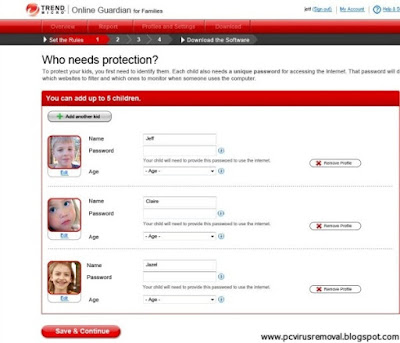
Trend Micro Online Guardian

Computers and usage of the internet become active part of teenager’s lives, and parents are more and more worried about them right to use inappropriate or unsafe stuff.

These worries aren't totally without source. In an impressive study by BitDefender, out of 1,570 parents asked, 95 % reported that their kids had right of entry adult stuff online. The similar study also set up that kids are flattering more techs know-how – 12 % of youth were able to uninstall or else get about parental control tools.

For a long time, trend Micro has been in the internet security business, but Online Guardian is its primary application aimed at concerned parents.
Trend Micro Online Guardian

The software comprise social network observing and internet filtering, and similar to a set of parental control software applications, it tries to stride the well line among keeping children’s secure online devoid of revealing their faith or limitation their liberty too much.

Fortunately, Online Guardian presents a group of scope for handling what it observes and blocks, so you can tweak it till you experience extra relaxed. This is value doing, as the settings mistake on the traditional side, and may block sites that you don't intelligence your children’s seeing.

You can as well utilize sliders to position times when kids can utilize the internet, and how long for.
Trend Micro Online Guardian review
Trend Micro Online Guardian download


There's no application to install throughout the primary setup process – the whole thing is completed by the web browser. Once you've ended, you download a small application that then implements the setting to any PC you run it on.

The applications web analyzing tool trapped most sites relating to barred types, but some did slip through. While clear-cut mature sites are without difficulty banned, Online Guardian occasionally escaped more compound and fuzzy sites that characteristic a combination of content – some which could be considered unsuitable.

Consumer reports are simple to interpret and recognize, but there is a clear impression on internet speeds when utilizing this service.   

Friday, April 20, 2012

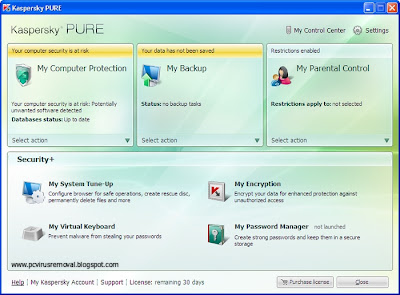
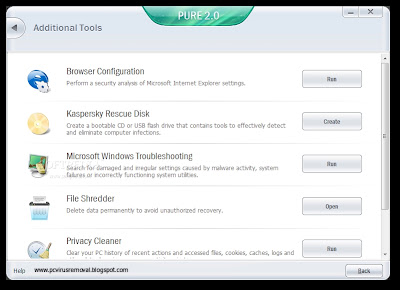
Kaspersky Pure review

Kaspersky presently recommends three diverse protection applications, in growing level of price: standard Kaspersky Antivirus, Kaspersky Internet Security and this one, Kaspersky Pure.

Together Antivirus and Pure are outstanding applications, and fixed all the malware in our experiment sweep with no declining quarry to any catches. The normal Antivirus verified slightly quicker, while sopping up uniformly insignificant additional system resources, and is a slightly cheaper, but Pure recommends little extra toys to have fun with. Either version you appear at, it’s going to be a brilliant product.

Internet Security secures on additional parental controls and tune-up features. Pure adds support to the combine and gripe ups the firewall module, with additional importance on the defense of your home network.
kaspersky pure


One of the attractive utility of Kaspersky Internet Security/Pure contains the capability to run applications in a sandbox, with no you having to exit to the problem of setting up selected virtual machines. Whichever app you have installed can be protected away in a single, recognized by a radioactive green glow about its window. A common folder switches any data-swapping.

You still should not utilize this to experimental programs you be familiar with are dodgy – or jog them in any way – but it’s a fine additional to have while browsing the web or annoying out latest applications.
kaspersky pure download
kaspersky pure review
Kaspersky’s protection is a well-built offering crossways the panel, with an additional instructive control panel than the majority, however one that offers simple configuration choices. It’s a little extra control for simply little quantity added, but you won’t be let down with the extra editions if you don’t require the spared.

Although Kaspersky's products suppose to be heavy system consuming, but it enures you permanent protection against all the latest and old threats.